hviolin
lq.hviolin(..data, y: auto, width: 50%, bandwidth: auto, fill: 30%, stroke: auto, color: auto, median: "o", mean: none, extrema: false, side: "both", boxplot: (:), whisker-pos: 1.5, num-points: 80, trim: true, label: none, clip: true, z-index: 2)(source)Generates a violin plot for each given dataset.
This is the horizontal version of violin.
A violin plot is similar to a boxplot but uses kernel density estimation
to visualize the distribution of the data points.
#lq.diagram(
  lq.hviolin(
    (0, 2, 3, 4, 5, 6, 7, 8, 3, 4, 4, 2, 12),
    (1, 3, 4, 5, 5, 5, 5, 6, 7, 12),
    (0, 3, 4, 5, 6, 7, 8, 9),
  )
)
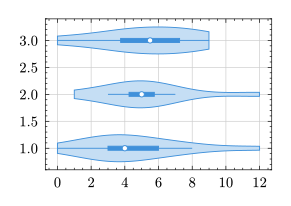
See violin for how to customize the boxplot displayed within the violin
plot.
By default, only the hviolin.median is highlighted as a special value. In
addition, hviolin.mean and hviolin.extrema allow for further visualization
options.
..data : array
One or more data sets to generate violin plots from. Each dataset should
be an array of numerical values (int or float).
y : auto | int | float | array default: auto
The coordinate(s) to draw the violin plots at. If set to auto,
plots will be created at integer positions starting with 1.
width : ratio | int | float | duration | array default: 50%
Width of the violins. See bar.width.
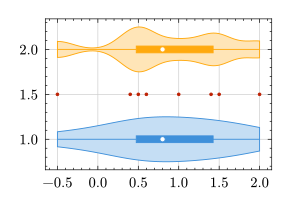
bandwidth : auto | int | float default: auto
Bandwidth for kernel density estimation. The bandwidth can drastically
influence the appearance and its selection requires good care. If set to
auto, Scott's rule is used (D.W. Scott, "Multivariate Density
Estimation: Theory, Practice, and Visualization", 1992).
#let data = (2, 1.5, 1.4, 1, .4, .6, .5, -.5)

#lq.diagram(
  lq.hviolin(data, bandwidth: auto),
  lq.hviolin(data, y: 2, bandwidth: .2),
  lq.scatter(data, (1.5,) * data.len())
)
fill : auto | none | color | gradient | tiling | ratio default: 30%
How to fill the violins. If a ratio is given, the automatic color from
style cycle is lightened (for values less than 100%) or darkened (for
values greater than 100%). A value of 0% produces white and a value of
200% produces black.
stroke : none | length | color | stroke | gradient | tiling | dictionary default: auto
How to stroke the violin outline.
color : auto | color default: auto
Color for the violin plot. Sets the base color from which hviolin.fill
and hviolin.stroke inherit. The boxplot fill and stroke also inherit
from this color (see violin-boxplot). Explicit values for fill,
stroke, or boxplot parameters take precedence.
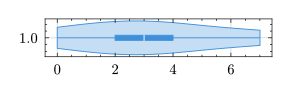
median : none | lq.mark | str | color | stroke | length default: "o"
Whether and how to display the median value. It can be visualized with a
mark (see plot.mark) or a horizontal line (by passing a color, stroke,
or length).
#lq.diagram(
  height: 1cm,
  lq.hviolin((0, 2, 3, 4, 7), median: white),
)
mean : none | lq.mark | str | color | stroke | length default: none
Whether and how to display the mean value, like hviolin.median.
extrema : bool default: false
Whether to mark the minium and maximum with vertical lines.
See violin.extrema.
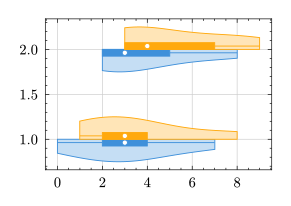
side : "both" | "low" | "high" default: "both"
Which side to plot the KDE at.
#lq.diagram(
  lq.hviolin(
    (0, 2, 3, 4, 7),
    (2, 2, 3, 5, 8),
    side: "low"
  ),
  lq.hviolin(
    (1, 3, 8, 4, 2),
    (3, 4, 3, 7, 9),
    side: "high"
  ),
)
boxplot : dictionary | none default: (:)
Arguments to pass to the violin-boxplot instance that is displayed
inside the violin plot. If set to none, no boxplot is shown.
whisker-pos : int | float default: 1.5
The position of the whiskers. See boxplot.whisker-pos.
num-points : int default: 80
Number of points (i.e., the resolution) for the kernel density estimation.
trim : bool default: true
Whether to trim the density to the datasets minimum and maximum value.
If set to false, the range is automatically enhanced, depending on the
bandwidth.
label : content default: none
The legend label for this plot. See plot.label.
clip : bool default: true
Whether to clip the plot to the data area. See plot.clip.
z-index : int | float default: 2
Determines the position of this plot in the order of rendered diagram
objects. See plot.z-index.
