layout
Applies special show rules that align diagrams as cells of a Typst grid. Refer to the subplot tutorial for more details.
Example:
#show: lq.set-diagram(width: 4cm, height: 2.2cm)

#figure({
  show: lq.layout // special layout rule

  grid(
    columns: 2,
    row-gutter: 1em,
    column-gutter: 1em,
    lq.diagram(
      lq.plot((1, 2, 3), (3, 2, 5)),
      lq.plot((1, 2, 3), (4, 4.5, 3)),
    ),
    lq.diagram(
      lq.bar((1, 2, 3), (3, 2, 5))
    ),
    lq.diagram(
      lq.plot((5, 7, 8, 9), (2, 3, 3, 4))
    ),
    lq.diagram(
      lq.bar((1, 2, 3), (11, 1, 4))
    ),
  )
})
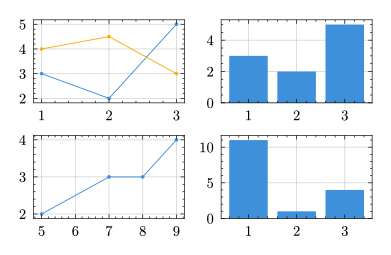
The alignment algorithm guarantees that the horizontal/vertical axis spines of diagrams in cells of a row/column line up nicely, independent of ticks, axis labels, titles, legends etc. When a diagram is placed in a cell that spans multiple rows or columns, the diagrams are aligned accordingly to match the correct row or column.
