ellipse
lq.ellipse(x, y, width: auto, height: auto, align: left + top, fill: none, stroke: auto, inset: 5pt, outset: 0pt, label: none, clip: true, z-index: 2, ..body)(source)Plots an ellipse or circle with origin (x, y). The origin coordinates as well
as width and height can either be given as
- data coordinates (
intorfloat), - or absolute coordinates from the top left corner of the data area (
length), - or in percent relative to the data area (
ratio), - or a combination of the latter two (
relative).
Note that coordinate types can also be mixed (e.g., a length for x and a scalar for y).
For example in order to access the center, you can write (50%, 50%).
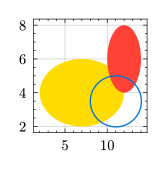
#lq.diagram(
  width: 3cm, height: 3cm,
  lq.ellipse(2, 2, width: 10, height: 4, fill: yellow),
  lq.ellipse(10, 4, width: 4, height: 4, fill: red),
  lq.ellipse(50%, 50%, width: 45%, height: 45%, stroke: blue)
)
x : float | relative | datetime
The x coordinate of the origin.
y : float | relative | datetime
The y coordinate of the origin.
width : auto | float | relative | duration default: auto
The width of the ellipse.
height : auto | float | relative | duration default: auto
The height of the ellipse.
align : alignment default: left + top
How to align the ellipse at the origin.
fill : none | color | gradient | tiling default: none
How to fill the ellipse.
stroke : auto | none | stroke default: auto
How to stroke the ellipse.
inset : relative | dictionary default: 5pt
How much to pad the content of the ellipse. See the built-in std.ellipse#inset.
outset : relative | dictionary default: 0pt
How much to expand the ellipse beyond its defined size.
See the built-in std.ellipse#outset.
label : content default: none
The legend label for this plot. See plot.label.
clip : bool default: true
Whether to clip the plot to the data area. See plot.clip.
z-index : int | float default: 2
Determines the position of this plot in the order of rendered diagram
objects. See plot.z-index.
..body : any
An optional body to place inside the ellipse. If width and/or height are set to auto, they will adapt to the content.
