Plot grids
To create a grid of subplots, just use the built-in Typst function grid. Applying the magic rule show: lq.layout ensures that all participating diagrams align nicely at their axes.
#show: lq.set-diagram(width: 4cm, height: 2.2cm)

#figure({
  show: lq.layout // special layout rule

  grid(
    columns: 2,
    row-gutter: 1em,
    column-gutter: 1em,
    lq.diagram(
      lq.plot((1, 2, 3), (3, 2, 5)),
      lq.plot((1, 2, 3), (4, 4.5, 3)),
    ),
    lq.diagram(
      lq.bar((1, 2, 3), (3, 2, 5))
    ),
    lq.diagram(
      lq.plot((5, 7, 8, 9), (2, 3, 3, 4))
    ),
    lq.diagram(
      lq.bar((1, 2, 3), (11, 1, 4))
    ),
  )
})
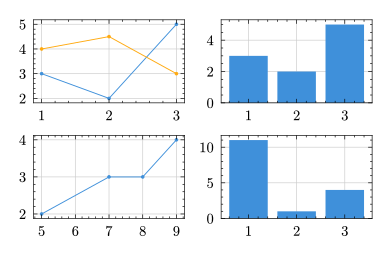
Normally and without this special show rule, the diagram's data areas do not align when the size of their titles, axis labels, tick labels etc. are not the same. In the example above, the ticks of the upper right diagram are all single-digit (0, 2, 4) while the one below has a two-digit number (10) that takes up more space. The function lq.layout compensates the spacing for each row and column, leading to a perfect diagram grid.
Per-row and per-column rules
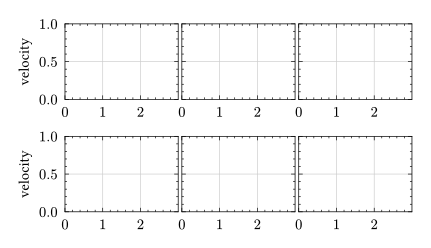
Through grid cell selectors, it is easy to apply uniform styling rules to all diagrams in a row or column. In the following example, this is demonstrated with a series of diagrams, all featuring the same -limits. It is only necessary to show tick labels for the first diagram, so we first hide labels on all diagrams and then reactivate them just for the first column.
#show: lq.layout

#show: lq.set-diagram(
  width: 3cm, height: 2cm,
  yaxis: (format-ticks: none),
  ylim: (0, 1),
  xlim: (0, 3),
  xaxis: (filter: (tick, pos) => tick < 3) // filter overlapping ticks
)

// Reactivate $y$-tick-labels for the first column
#show grid.cell.where(x: 0): it => {
  show: lq.set-diagram(yaxis: (format-ticks: auto), ylabel: [velocity])
  it
}

#grid(
  columns: 3,
  row-gutter: 1em,
  ..(lq.diagram(),) * 6,
)
Integration with Typst grid
The show rule with lq.layout integrates seamlessly with all features provided by the grid function, including
- rowspans and colspans,
- row and column gutters,
- filling the available cell space with diagrams that have
100%width and/or height, - and distributing space proportionally, e.g., by specifying fractional column sizes like
columns: (1fr, 2fr).
Strict or relaxed bounds?
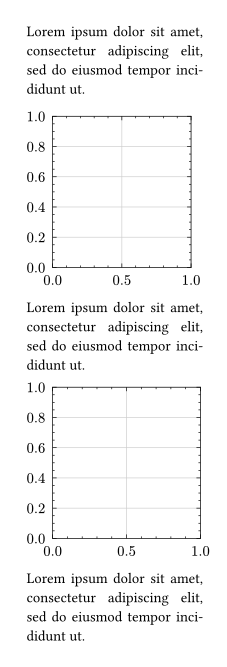
Lilaq has two (actually three) strategies for computing the bounding box of a diagram that can be selected through the diagram.bounds parameter: "relaxed" and "strict" (and "data-area"). In strict mode, the full bounding box of the diagram is computed including all ticks. In the relaxed mode, however, tick labels of an -axis are allowed to hang into the page or container margins at the right and left sides of a diagram (and tick labels of a -axis at the top and bottom). Like this, the spines can line up with the main text body, even when the first and last tick sit on the far edges of an axis. Sometimes, this can give a cleaner look in a document.
This is best demonstrated with an example.
#set page(width: 6cm, margin: 0.7cm)
#set par(justify: true)

#show: lq.set-diagram(width: 100%, height: 4cm)


#lorem(14)

#lq.diagram()

#lorem(14)

#lq.diagram(bounds: "relaxed")

#lorem(14)
Complex example
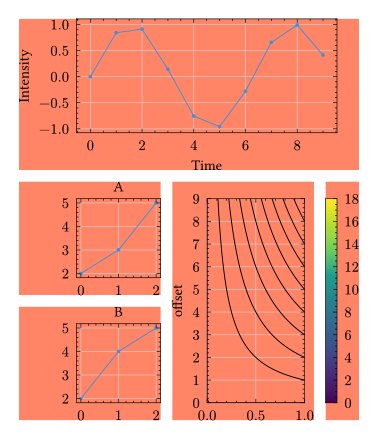
A variety of these features are demonstrated in the example below. The grid cells are weakly filled to highlight the distribution of available space.
#set page(height: auto, width: 10cm)

#show: lq.layout
#show: lq.set-diagram(width: 100%, height: 100%)

#let mesh = lq.contour(
  lq.linspace(0, 1),
  lq.linspace(0, 9),
  (x, y) => 2*x*y
)

#grid(
  columns: 3,
  rows: (4cm, 3cm),
  fill: rgb("#ff856620"),
  column-gutter: 0.8em,
  row-gutter: 0.8em,
  grid.cell(
    colspan: 3,
    lq.diagram(
      xlabel: [Time],
      ylabel: [Intensity],
      lq.plot(range(10), calc.sin)
    )
  ),
  lq.diagram(
    title: [A],
    lq.plot((0, 1, 2), (2, 3, 5))
  ),
  grid.cell(
    rowspan: 2,
    lq.diagram(
      ylabel: [offset],
      ylim: (0, 9),
      mesh
    )
  ),
  grid.cell(
    rowspan: 2,
    lq.colorbar(mesh)
  ),
  lq.diagram(
    title: [B],
    lq.plot((0, 1, 2), (2, 4, 5))
  ),
)